









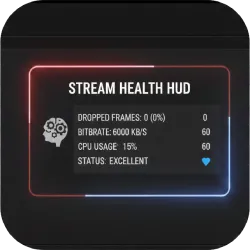
Stream Health HUD
Add a lightweight real-time performance HUD to OBS using a standard Text (GDI+) source. Shows stream/recording time, dropped frames, CPU usage, and estimated bitrate with an adjustable update interval and one-click enable/disable.
OBS Performance HUD (Lua Script)
This lightweight Lua script adds a real-time performance HUD inside OBS using a standard Text (GDI+) source. It continuously updates a single text source with key streaming metrics, making it ideal as an on-screen debug overlay or as a private monitoring panel placed off-screen.
The HUD can be enabled or disabled at any time. When disabled, the script automatically clears the text so it never clutters your scene.
What It Displays
- Stream or recording time
- Dropped frames
- CPU usage
- Estimated bitrate (kbps)
Features
- Uses Text (GDI+): avoids FreeType (deprecated in this workflow)
- Real-time metrics: time, dropped frames, CPU usage, and bitrate
- Adjustable update interval: control how frequently the HUD refreshes
- Simple source selector: choose which Text source to update
- Enable/Disable toggle: turn the HUD on or off instantly
- Auto-clear on disable: text is removed automatically when the HUD is off
- Ultra lightweight: no plugins required
Use Cases
- Debug overlay: keep performance stats visible while testing scenes, filters, or encoders
- Private monitoring: place the text off-screen or behind a mask so only you can see it in the preview
- Recording checks: verify bitrate stability and dropped frames during long captures
How to Use
- Add a Text (GDI+) source in OBS (name it something recognizable, e.g.
HUD). - Open Tools → Scripts.
- Click the + button and load the
.luascript. - Select your Text (GDI+) source from the dropdown.
- Set your preferred update interval.
- Enable the HUD using the checkbox.
Notes
- If you don’t see any text, confirm you selected the correct Text (GDI+) source and that it is present in the active scene (or in a nested scene/source that is visible).
- For minimal impact, use a slightly higher update interval (e.g., 500–1000 ms) unless you need ultra-fast updates.

