OBSWeather.com The Best Weather Stream Overlay and Live Forecast Widget for OBS
OBSWeather.com The Ultimate Weather Stream Overlay and Live Forecast Widget
Enhance your Twitch or YouTube broadcast with professional weather overlays, live weather forecasts, and automatic weather alerts powered by OBSWeather.com.
In today’s competitive streaming world, presentation is everything. Viewers aren’t just tuning in for your gameplay, commentary, or vlogs they’re drawn to streams that feel dynamic, immersive, and professional. A well-designed weather stream overlay can instantly transform your broadcast, giving your audience a layer of real-time information that’s both practical and visually engaging. That’s where OBSWeather.com comes in an innovative platform that brings accurate weather data, forecasts, and alerts directly into your OBS scene.
Why Every Streamer Should Use a Weather Stream Overlay
A weather stream overlay is more than just decoration it’s a live informational layer that shows your viewers real-time weather updates. Whether you’re streaming outdoor adventures, cityscapes, or simply want to add an ambient touch to your content, a weather overlay helps you create a more interactive experience. It can display current temperature, forecasts, humidity, wind speed, and even upcoming storms all updating automatically without manual refreshes.
Adding a weather overlay also helps differentiate your brand. It signals that you care about quality and attention to detail, improving both viewer engagement and retention. For travel vloggers, aviation enthusiasts, or local event streamers, it’s an essential visual element.
OBSWeather.com: The Smart Choice for Streamers
OBSWeather.com takes the hassle out of configuring a weather feed manually. It’s a plug-and-play service built specifically for creators who use OBS Studio, Streamlabs, or any software that supports browser sources. With its clean design, quick setup, and extensive customization options, it’s the leading solution for weather stream overlays and weather alert overlays today.
Main Features of OBSWeather.com
- Live Weather Forecast Integration: Real-time conditions, hourly forecasts, and extended outlooks for any city worldwide.
- Dynamic Weather Alerts: Automatic notifications for severe weather warnings across the United States perfect for real-time broadcasts or news segments.
- Customizable Overlay Themes: Choose from light, dark, minimal, and cinematic styles that blend seamlessly into your stream layout.
- Widget-Based System: Modular weather widgets for OBS that can be positioned anywhere on your scene.
- Simple Setup: Copy-paste a single browser URL and your live weather overlay instantly updates on-stream.
How to Add a Live Weather Overlay to OBS
Getting started with OBSWeather.com is incredibly simple. Here’s a quick guide to help you set up your first live weather forecast widget:
- Visit OBSWeather.com.
- Enter your location or coordinates to fetch live weather data.
- Choose your preferred theme, units (Celsius or Fahrenheit), and layout style.
- Copy the generated browser source URL.
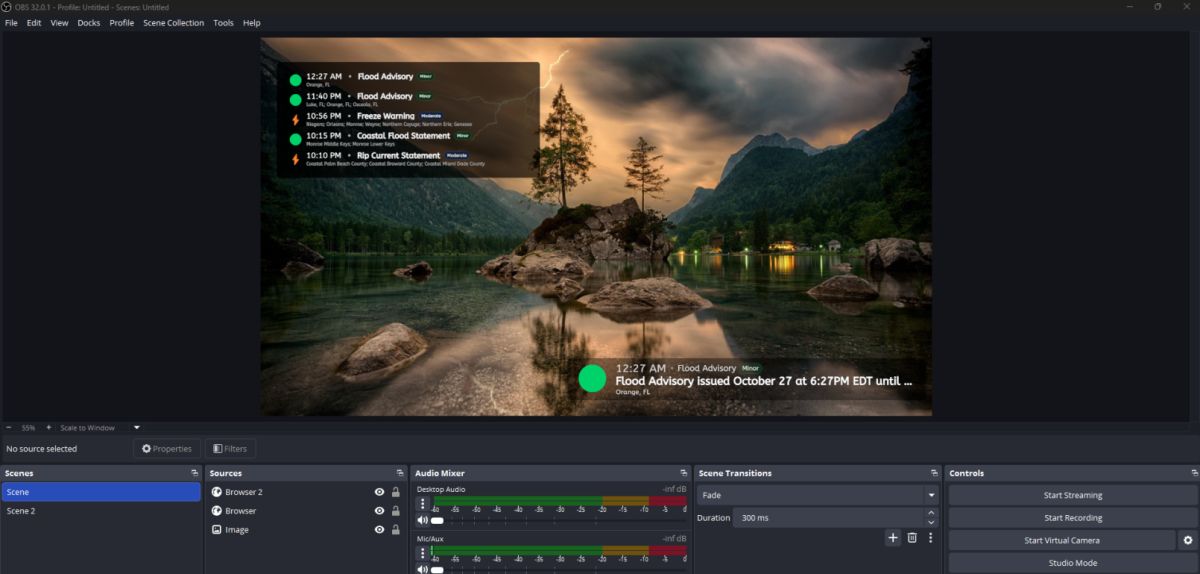
- In OBS Studio, add a new Browser Source, paste the link, and adjust the dimensions.
That’s it! Your weather stream overlay will now auto-update with real-time data and weather alerts without any extra setup or API configuration.
Weather Alert Overlays: Stay Informed in Real Time
One of the standout features of OBSWeather.com is its weather alert overlay system. Using official weather feeds and alerts, it displays live notifications for warnings such as storms, hurricanes, floods, or heat waves. Streamers in the U.S. can choose to show only alerts for their specific state or region, creating a localized layer of information during broadcasts.
Imagine streaming a morning show, local news, or travel vlog and instantly displaying a “Severe Thunderstorm Warning” banner at the bottom of your screen. This kind of live, contextual data not only makes your stream feel broadcast-quality but also keeps your viewers informed and engaged.
Why a Live Weather Forecast Overlay Boosts Engagement
Adding a live weather forecast to your stream has psychological benefits for viewer retention. It gives your broadcast a sense of motion and “live” authenticity. Viewers subconsciously associate live weather information with professionalism, similar to television channels. It also adds relevance your viewers might stay longer simply because your stream doubles as a live source of local weather information.
Some creators even use weather overlays as interactive talking points. For example, a gaming streamer might comment on real-world conditions matching the in-game environment or a travel vlogger might use the overlay to highlight temperature contrasts across destinations.
SEO Benefits for Content Creators
Integrating OBSWeather.com into your streaming workflow has direct SEO advantages both for your channel and web presence. Search engines favor multimedia content that provides structured, relevant information. By embedding a weather stream overlay or live weather forecast widget, you naturally incorporate location-based and time-sensitive keywords into your stream titles, descriptions, and thumbnails.
Use SEO-rich phrases such as “live weather overlay for OBS,” “real-time forecast widget,” or “weather alert overlay for Twitch.” OBSWeather’s on-screen graphics help reinforce these keywords visually a powerful combination for discoverability on YouTube, Kick, and Facebook Live.
Perfect for All Types of Streamers
Whether you’re streaming outdoor IRL content, producing a local news show, or hosting a gaming marathon, OBSWeather fits perfectly. Outdoor creators can display live temperatures and wind speeds. Broadcasters can highlight weather alerts in real time. Even chill “Just Chatting” streams can use minimalist overlays as background ambience.
Because the platform runs entirely through a web browser, it’s cross-compatible with all major streaming tools no plugins, scripts, or coding knowledge required.
Final Thoughts: Elevate Your Stream with OBSWeather.com
Incorporating a weather stream overlay is one of the easiest ways to add depth and professionalism to your live broadcasts. OBSWeather.com offers everything you need real-time data, automated updates, customizable visuals, and weather alerts all designed to integrate flawlessly with OBS Studio. Whether you want to display a subtle live weather forecast in the corner of your screen or run a full-screen weather alert overlay for breaking updates, this tool makes it effortless.
Ready to upgrade your stream? Visit OBSWeather.com today and see how professional weather overlays can transform your next live broadcast.